• Support Home
  • FAQs
  • Knowledge Base
    • DNS
    • Free Dynamic DNS
    • General
    • Domain Registration
    • Email
    • Billing & Account
    • Routers & Firewalls
    • Server Monitoring
    • Servers & Remote Access
    • SSL Certificates
      • Generating a CSR
    • Tools
    • Troubleshooting
    • Update Clients
  • Download
  • Log In
  • Contact
  • Open a Ticket
  • Blog
  • No-IP.com
Managed DNS Services
support center
  • Support Home
  • FAQs
  • Knowledge Base
    • DNS
    • Free Dynamic DNS
    • General
    • Domain Registration
    • Email
    • Billing & Account
    • Routers & Firewalls
    • Server Monitoring
    • Servers & Remote Access
    • SSL Certificates
      • Generating a CSR
    • Tools
    • Troubleshooting
    • Update Clients
  • Download
Knowledge Base
Home/Knowledge Base/My No-IP

How To Cancel Your No-IP Subscription

Last updated: July 29, 2026

No-IP’s services all run on subscription plans, meaning they will continue to be billed annually or monthly until you cancel the subscription. Please keep in mind that canceling a subscription does not turn off or remove the service from your account.

Canceling a subscription only ensures that we do not bill you in the future to renew the service. The service will continue to function until its expiration date.

However, if you wish to reactivate the service, you may do so from the Subscription Management page. This guide will assist you with canceling and reactivating your subscriptions.

Cancelling Your Subscription

Step 1

Log into your My No-IP account by clicking on Log In at the top right of the No-IP homepage.
Log In

Step 2

Once logged into your My No-IP Account, click on Account and then Subscription Management.
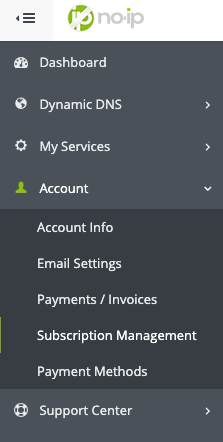
Subscription Management

Step 3

Click the arrow “>” next to the subscription to see the details. On the far right, under Subscription Actions you will click Cancel Subscription.
Cancel Subscription

Step 4

You should now be on the Cancel Subscription window.
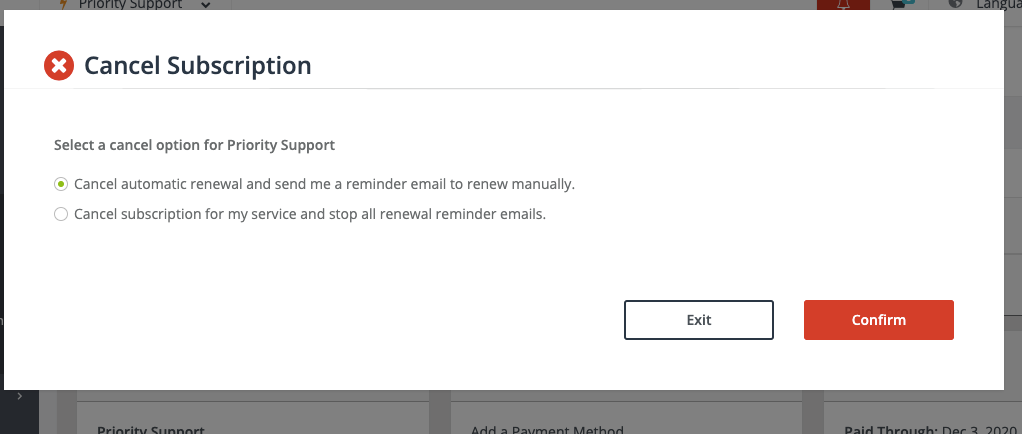
Cancel Subscription 2

You can choose to cancel with our without reminders. Once you click confirm that subscription will be cancelled.

Renewing Your Subscription

To Renew a subscription, you can click Renew Subscription from the Subscription Actions.
Renew Subscription

This should bring you to the plan builder where you can choose the amount of years to renew for. Once paid, your subscription will be set for the selected years.

Create a Free Account

Sign Up

Helpful Links

  • Getting Started Guide
  • Tools
  • Open a Ticket
  • Contact

Knowledge Base Articles

  • Where is my Two-Factor Authentication Code?
  • A Quick Guide to Using Alternate-port SMTP with Exchange
  • Account Log In Issues
  • How do I activate my account if the account was deactivated?
  • How To Add An MX Record
  • How to add a TXT Record to a Round Robin Hostname
  • How to Add CAA Records

Knowledge Base Categories

  • Billing & Account
  • DNS
  • Domain Registration
  • Email
  • Free Dynamic DNS
  • General
    • Service Configuration
  • Managed DNS
  • My No-IP
  • Routers & Firewalls
    • Port Forwarding
  • Server Monitoring
  • Servers & Remote Access
  • SSL Certificates
    • Generating a CSR
  • Support Question of the Day
  • Tools
  • Troubleshooting
  • Update Clients
  • Videos

Report Abuse

If you believe the actions of one of our users violates our Terms of Service, please inform us immediately at:

abuse@no-ip.com

Contact Support

+1 775.853.1883
+1 877.367.6647 (inside the US)
+1 775.853.1886 (fax)

Monday-Friday
6:30am - 5:30pm PT

Helpful Links

  • Getting Started Guide
  • Tools
  • Open a Ticket
  • Contact

Get Connected

Follow No-IP


Translate

© 2026 No-IP.com • All Rights Reserved
  • Support Home
  • FAQs
  • Knowledge Base
  • Download
3803