Login to the Linksys router via the default gateway address.
-
Click on “Router Settings” and then select “Security.”
 Click on “Apps and Gaming” and then “Single Port Forwarding.”
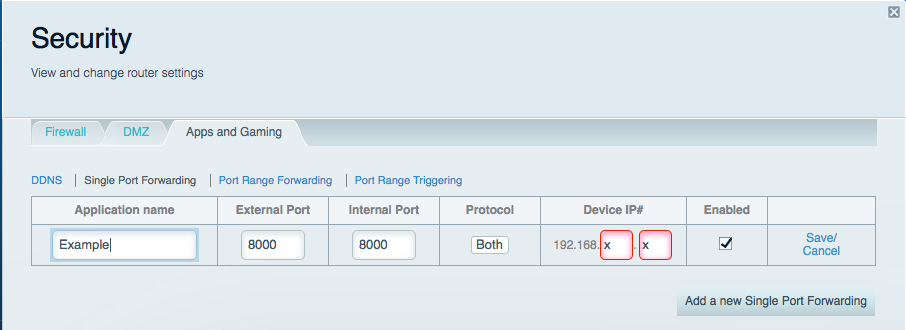
 Click on “Add a New Single Port Forwarding.” Fill in the Application Name, External Port, Internal Port and Device IP boxes. Select “Both” under Protocol and click “Enabled.”
 Click “Save.”
You should now be able to connect to your device via a web browser. Simply enter your hostname followed by the port number into the address bar. For example http://hostname.ddns.net:8000
Please Note: If you are using a mobile application, you will simply need to use your hostname to connect. The application should already specify the port when attempting to make the connection.
Click “Save.”
You should now be able to connect to your device via a web browser. Simply enter your hostname followed by the port number into the address bar. For example http://hostname.ddns.net:8000
Please Note: If you are using a mobile application, you will simply need to use your hostname to connect. The application should already specify the port when attempting to make the connection.